
Overview
The ChatFactory Analytics Dashboard provides a centralized, interactive view of how interactions impact engagement and content consumption across accounts and visitors. It allows sales and marketing teams to monitor visitor behavior, surface high-intent accounts, and evaluate chatbot performance through detailed KPIs and drill-down paths.
Filters
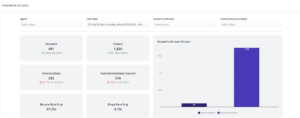
At the top of the dashboard, you’ll find filters to customize your view:
- Agent – Filter metrics by specific chat agent, all are agents included by default.
- Visit Date – Set your time window for analysis.
- Account Exclusion – Select one or multiple accounts that you would like excluded from all reporting data.
- Domain Exclusion – Exclude domains to exclude accounts from the data on a broader level.
High-Level KPIs
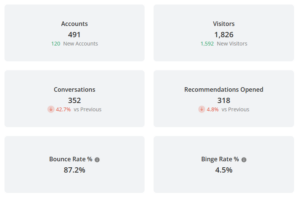
These metrics give you a quick health check of engagement over your selected date range:
- Accounts Reached: Total and new accounts that interacted.
- Visitors: Total and new visitors.
- Known vs Unknown Visitors: Breakdown by identified email address versus anonymous.
- Conversations: Total chat interactions by visitors (+% change from previous period).
- Bounce Rate: % of visitors who left without any interactions.
- Binge Rate: % of visitors who consumed multiple content assets from recommendations.
- Total Duration: Cumulative time spent chatting.
- Total View Time (Recs): Cumulative time spent with the recommended content.
- Form Fills: Total number of forms submitted.
- Experiences Created: Number of experiences generated by users.
Account Table
A detailed breakdown by company domain including:
- Conversation volume
- % change in activity
- Recommendations served
- Form submissions
- Total engagement duration
- Content view metrics
Tip: Click on any account row to open the full analytics drill-down page for that company. “Undefined” represents unknown accounts with no available reverse IP data.
Visitor Table
See granular data per visitor:
- Visitor identity
- Session timestamp
- Conversation summary (query, response, agent)
- Sentiment (emoji coded)
- Query type and top content titles
- Matching logic (relevance scores)
- Visitor source, return/new status
Tip: Unknown visitors have an encrypted ID that will reconcile all previous engagement when a user becomes known.
Recommendations Table
Tracks what content was recommended and whether it was clicked:
- Account name
- Content title & URL
- Clicked (yes/no)
- Recommendation context (chat session ID, agent)
Form Fills Table
Insight into lead conversion directly from chatbot interactions:
- Visitor identity
- Account
- Timestamp
- Form name
- Form impressions and conversions
- Associated agent/session ID
🔗 Navigation & Drill-Downs
Every table row includes live links to:
- Account analytics views
- Visitor journey views
Use Cases
- Sales: Identify which accounts are actively engaging with chatbot-driven content.
- Marketing: Evaluate campaign and content effectiveness via chatbot routes.
- CSM/Success: Monitor known visitor behavior for expansion signals.
Audit Tab
Summary:
The ChatFactory Audit tab provides a comprehensive view of how ChatFactory agents are performing across your digital touchpoints. It highlights where agents are deployed, what content they’re recommending, and how those recommendations drive downstream engagement. This visibility helps teams optimize agent placement, content strategy, and lead capture effectiveness.
Agent Attribution:
Understand where ChatFactory agents are deployed and how they’re performing. This enables you to evaluate their impact on visitor engagement and identify high-performing placements.
Content Audit:
See which content assets are being recommended by ChatFactory agents and how users respond. This helps surface the assets that drive the most engagement and uncover optimization opportunities for content strategy.
Generated Experiences & Landing Pages:
Track when visitors or accounts generate take-away experiences from chat interactions. This provides a clear view of additional engagement driven by ChatFactory, linking chat interactions to meaningful follow-up activity and conversion opportunities.
Views: 258