
Overview
Demand gen and ABM teams know their buyers expect personalized experiences. When a cybersecurity leader and a financial services buyer both land in your content experience, the headline, value proposition, and call to action should feel distinct, specific to their world, their challenges, and what your solution does for them. The problem is that delivering that level of relevance at scale requires writing different copy for every field merge across every segment, every campaign. It compounds fast, and most teams reach a breaking point where they have to choose between running more campaigns or running more personalized ones.
AI-Generated Copy for Segment Rules removes that constraint entirely. Using your campaign brief, your segment definitions, your brand persona, and the copy anchors you’ve already written, PathFactory’s AI generates a complete, ready-to-review set of personalized copy across every segment in a single pass. What took hours now takes minutes, and the output doesn’t just fill blanks. It reflects your campaign’s thematic intent, tailored to each audience, so every segment receives messaging that reads as if it were written specifically for them.
Benefits
PathFactory customers who run personalized content experiences see the results: higher content engagement, faster buyer progression, and more pipeline. The promise of personalization is well understood. What’s held most teams back isn’t intent, it’s execution. Writing custom copy for every field across every segment, campaign after campaign, is a resource constraint that quietly forces teams to compromise. Most campaigns launch under-personalized, not because the strategy calls for it, but because there simply wasn’t time to do it right.
AI-Generated Copy for Segment Rules changes that calculus entirely. What once required hours of copywriting per campaign, crafting distinct headlines, value propositions, and calls to action for every audience segment, now takes minutes. Your team sets the campaign direction once, and the AI handles the rest, producing tailored copy for every segment that reads as if a senior marketer wrote it specifically for that audience.
The impact compounds across campaigns. Teams that previously had to choose between running more campaigns or running more personalized ones no longer face that trade-off. Demand gen and ABM teams can now pursue genuine 1:1 and 1:few personalization at the scale their pipeline requires without adding headcount or slowing down launch timelines.
Beyond speed, this is about quality at scale. The AI draws on everything it knows about your campaign, your brand persona, your campaign brief, your segment definitions, and the specific copy you’ve anchored to individual fields to generate outputs that are contextually grounded, on-brand, and aligned with your campaign intent. You’re not trading personalization quality for volume. You’re getting both.
Prerequisites
AI-Generated Copy for Segment Rules is automatically available to customers with the Templated Experiences feature. To use it, your organization must have agreed to PathFactory’s AI usage terms. You will also need admin or author-level permissions to access the AI Personalization Launchpad and save the generated copy. Before running the launchpad, ensure you have created the segments you want to use. The quality and relevance of the generated copy depend on having well defined segments in place that accurately reflect your target audiences.
How It Works
Dynamic Personalization in PathFactory works through segment rules configurations that map specific audience segments to custom field merges. A field merge like {{custom.hero.headline}} acts as a placeholder that displays different copy depending on which segment a visitor belongs to. Where a cybersecurity buyer might see “Protect your stack before the breach happens,” a financial services buyer sees “Accelerate compliance without slowing your team down” the same experience, the right message for each audience.
Previously, writing those distinct messages for every field merge across every segment was entirely manual. AI-Generated Copy for Segment Rules changes that by introducing the AI Personalization Launchpad, a three-step workflow that gives the AI everything it needs to generate relevant, on-brand copy for every combination.
What makes the output genuinely useful rather than generic is the layered intelligence behind it. The AI draws on four inputs, in order of priority: the specific fallback copy and custom field merge values you’ve already defined (which anchor the AI to your established messaging), the definitions of each selected segment (which give the AI audience context to differentiate copy), your campaign brief (which sets the strategic direction and tone), and your organization’s base prompt (which applies your brand persona consistently across every output). If you’ve written fallback copy for a field that references a specific asset or campaign theme, the AI preserves that thematic anchor when generating segment-specific variations. It’s not starting from scratch; it’s starting from you.
There is also a built-in quality safeguard: if the AI cannot confidently improve on your fallback copy for a given field, it returns the fallback unchanged rather than generating something off-brand or generic. Every output lands directly in the Segment Rules table for your review. Before anything goes live, you stay in control of what your buyers see.
How to Use It
To generate AI-powered copy for your segment rules, launch the AI Personalization Launchpad from Personalization > Segment Rules. The entire workflow from brief to generated copy takes minutes.
1 Navigate to Personalization > Segment Rules from the main menu. You will see your existing segment rule groups and the full table of custom field merges. Click Use AI to Setup Personalization in the top right to open the AI Personalization Launchpad.
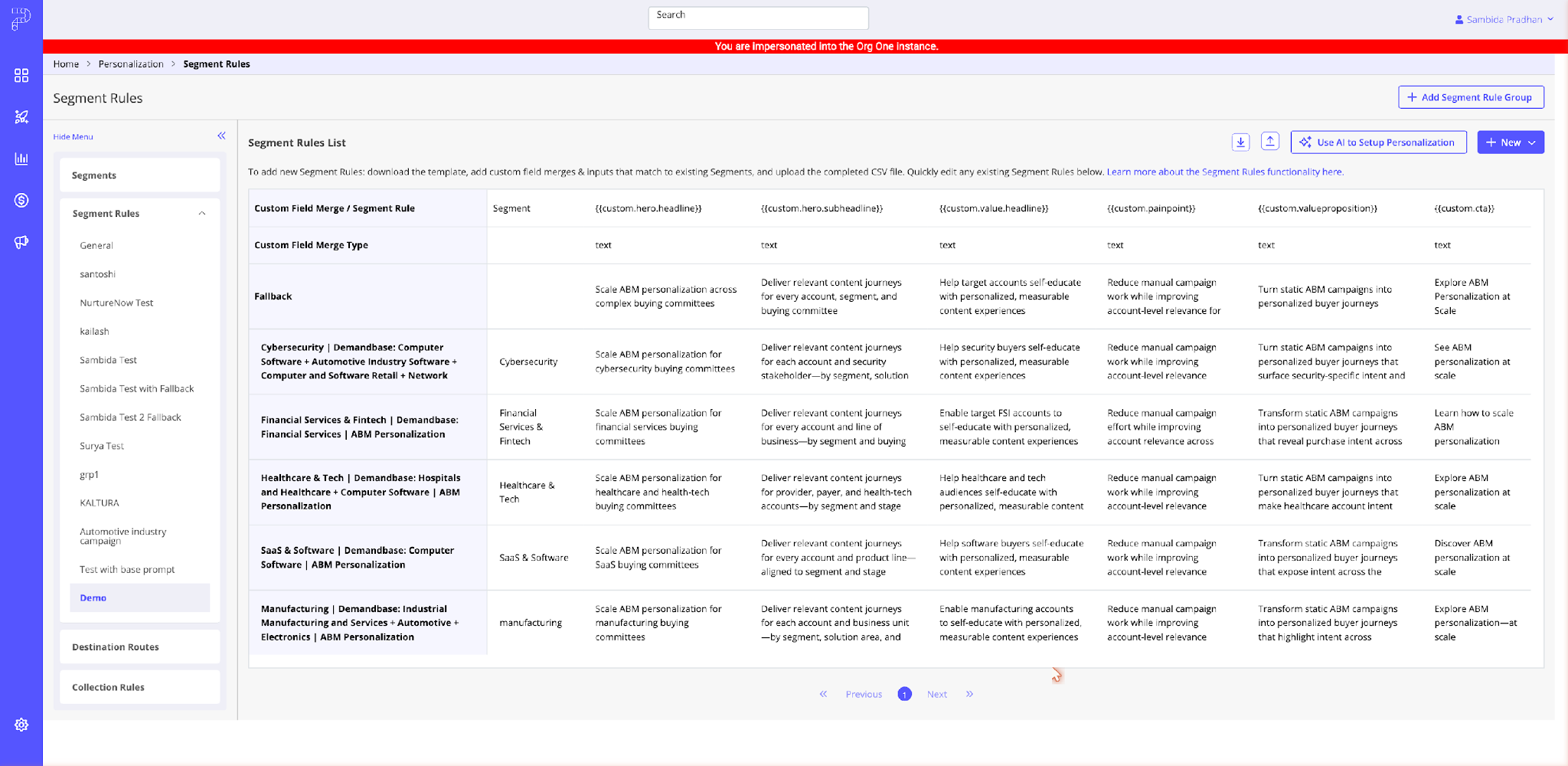
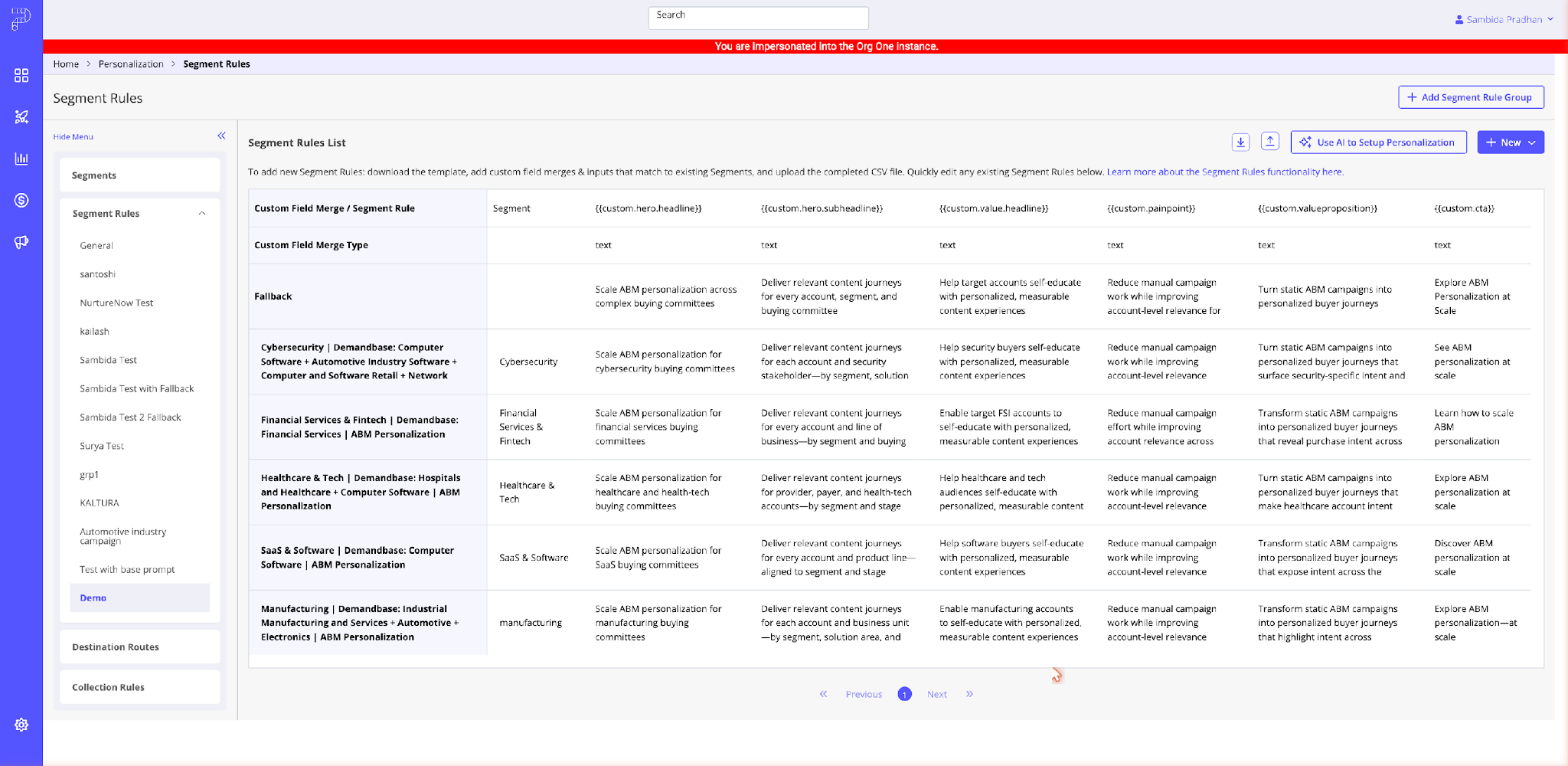
2 In Step 1: Frame Your Campaign, enter your campaign brief. Describe your campaign goals, target audience, and the core message you want each segment to receive. The more specific your brief, the more targeted the AI’s output will be. This input sets the strategic intent that runs through every piece of generated copy. Choose whether you want AI to fill empty values only or overwrite all existing values, then click Next.
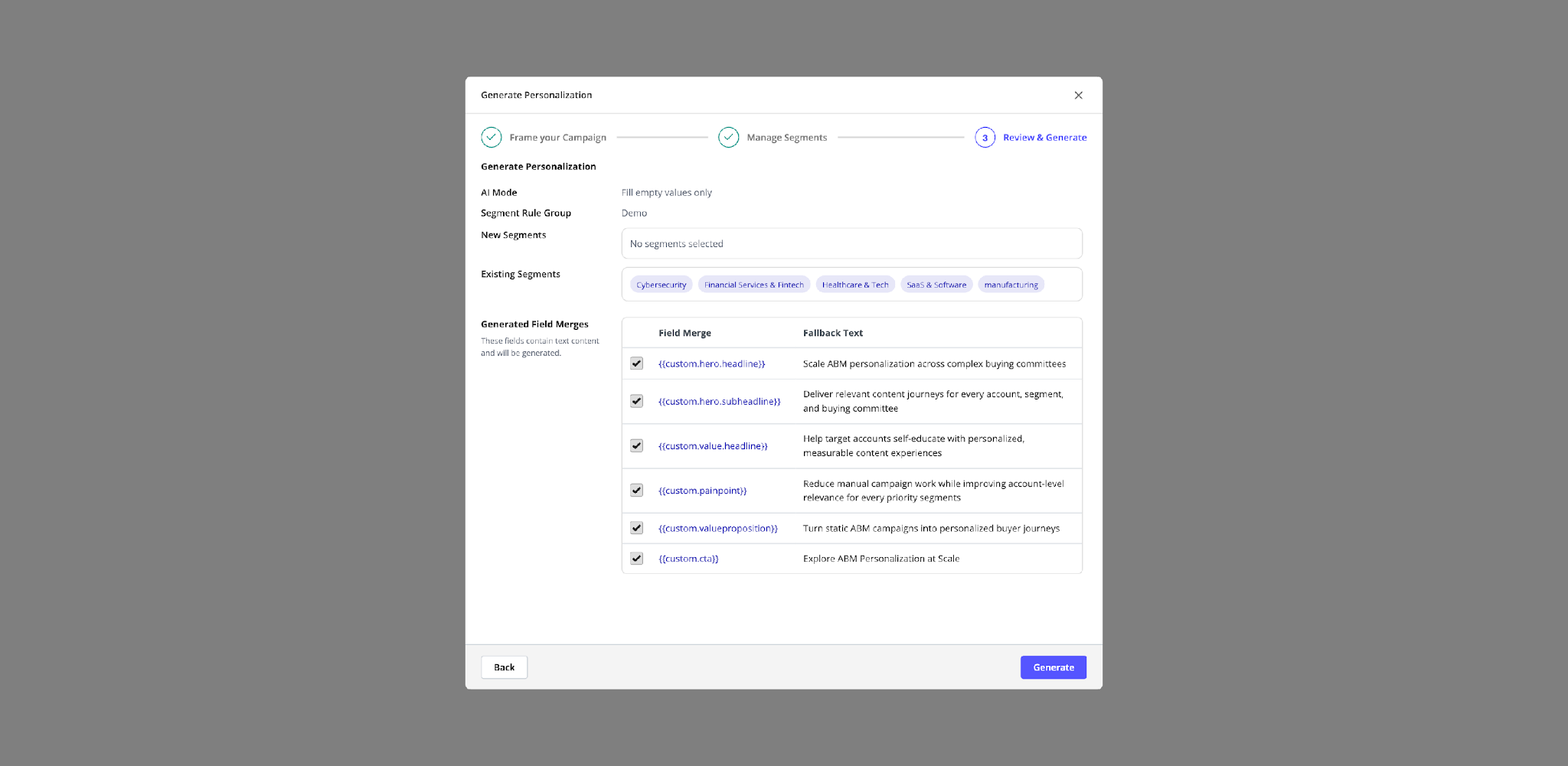
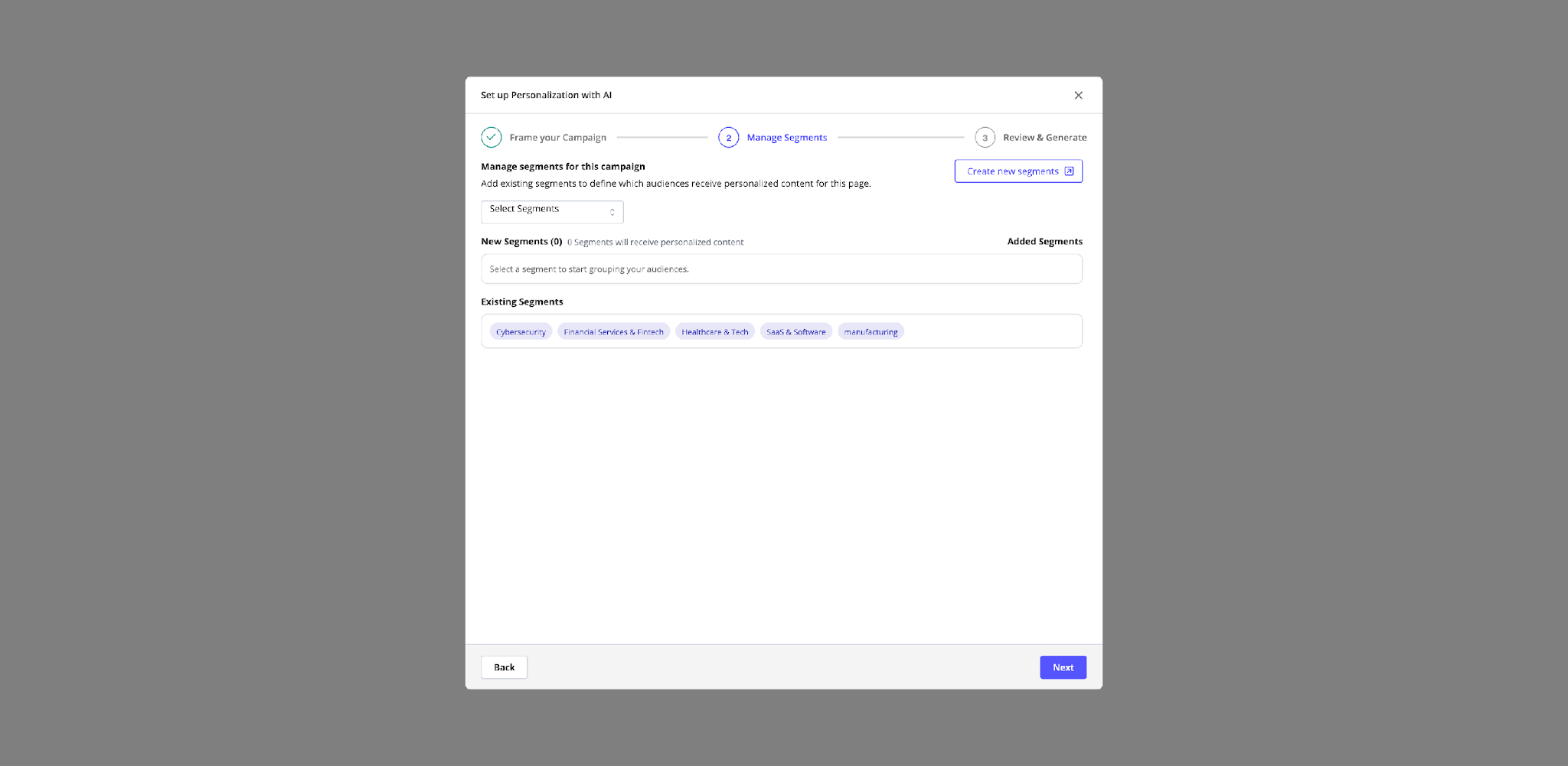
3 In Step 2: Manage Segments, select the segments you want to include. Each segment you add will receive its own personalized copy across every custom field merge this is where the AI learns who it’s writing for. Click Next when your selections are complete.
4 In Step 3: Review & Generate, review the custom field merges that will be populated and confirm the fallback text for each field. The AI uses your fallback as a thematic anchor keeping your fallback accurate and specific here directly improves the quality of generated output. Select which fields to include, then click Generate.
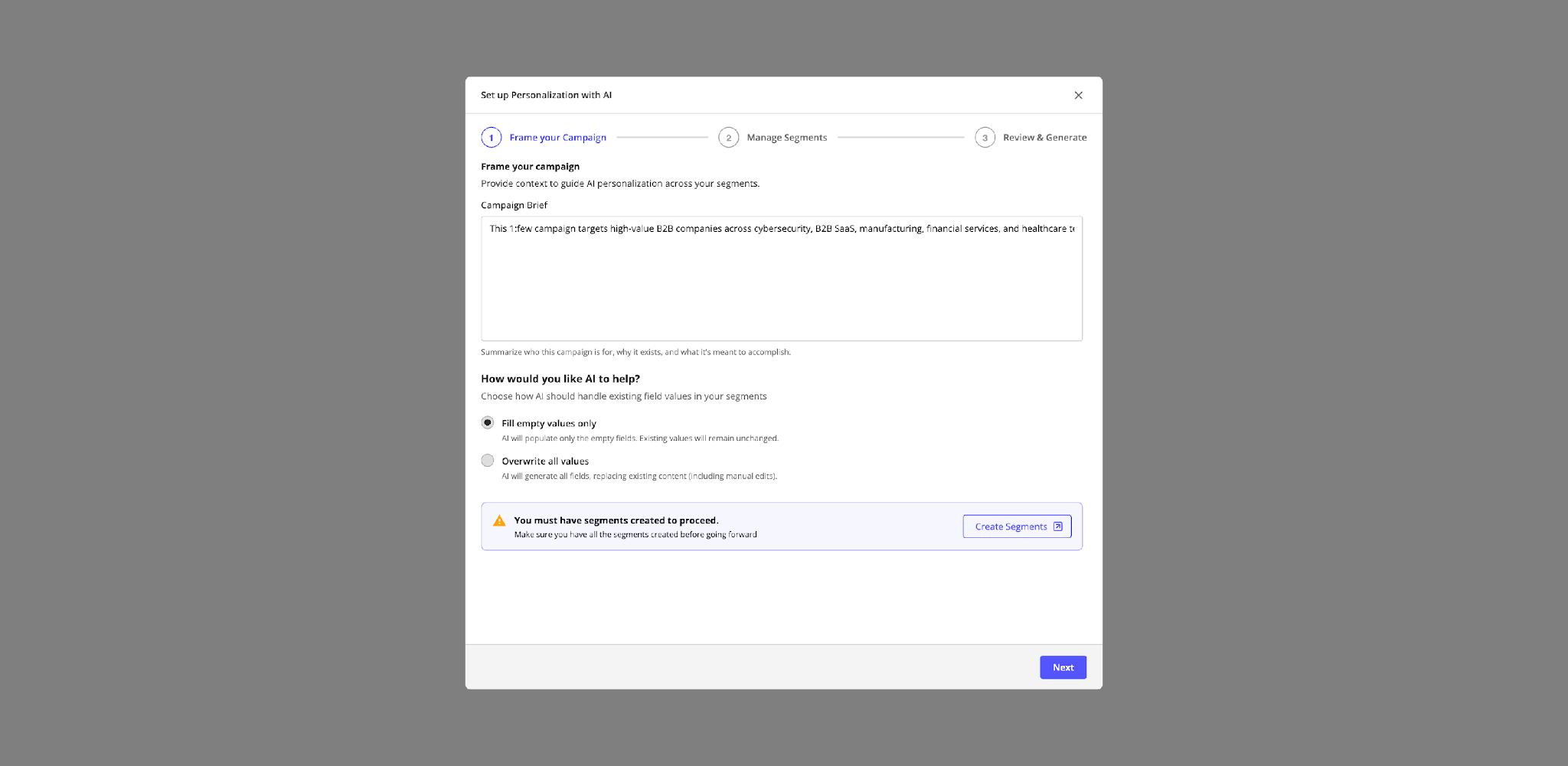
5 Once generation completes, the Segment Rules table updates with AI-generated copy for each field merge across every selected segment. Review each entry inline, refine any values, and save. Your personalized content experience is ready to go live.
Example Use Cases
ABM campaign across multiple industries. A demand generation marketer running a 1:few ABM campaign targeting cybersecurity and financial services accounts needs distinct messaging across multiple custom field merges for each vertical. Instead of writing every combination manually, they enter a focused campaign brief in the Launchpad, select their industry segments, and generate all copy in a single pass. The result is a fully personalized campaign for two distinct buying audiences launched in a fraction of the time it would have taken to write every message from scratch.
Multi-persona nurture track. A marketing team running a nurture experience for both technical buyers and business decision-makers uses segment rules to differentiate messaging for each persona. With AI-generated copy, they draft persona-specific language for every field merge and refine tone before saving. The campaign launches with genuinely distinct messaging for each audience, the kind of differentiation that would typically require a full copywriting sprint, delivered in a single session.
Customer onboarding and education programs. A customer success team using Templated Experiences to onboard new accounts across different product tiers needs messaging that reflects each customer’s specific use case and maturity level. Rather than writing separate copy for enterprise, mid-market, and SMB onboarding tracks, they define segments by tier, enter a brief focused on activation goals, and generate tailored messaging for each in one pass. Every customer receives onboarding guidance that feels relevant to where they are in their journey, built in one session instead of three.
Getting the Most Out of AI-Generated Copy for Segment Rules
The AI draws on four inputs to generate personalized copy and the quality of your output reflects the quality of what you give it. Understanding how each input is used helps you get the most out of every generation.
Fallback copy and custom field merge values carry the most weight. If you’ve written fallback text for a field, the AI treats it as a thematic anchor, generating segment-specific variations that stay true to the direction your fallback establishes. A fallback that references a specific asset, framework, or campaign theme produces AI copy that preserves that framing, adjusted for each audience. Make sure your fallbacks are specific and on-brand before you run a generation.
Segment definitions are the next signal the AI uses to differentiate copy across audiences. Well-defined segments by industry, persona, account tier, or intent give the AI the context it needs to write messaging that feels tailored to that group. Vague or overlapping segment definitions produce less differentiated output. The time you invest in segment quality shows directly in the results.
Your campaign brief sets the strategic intent and tone that runs through every piece of generated copy. Be specific about your campaign goals, the challenges your target buyer faces, and the core message you want to land. A brief that articulates a clear point of view produces sharper, more actionable copy than one describing broad campaign themes.
Your organization’s base prompt configured in your organization settings applies your brand voice and persona to every generation, across every campaign. If your base prompt defines a communication style and perspective, that consistency carries through automatically. Keep your base prompt current, and it becomes a standing quality bar across all AI-generated outputs.
FAQs
Can I edit the AI-generated copy after it is generated?
Yes. All generated copy appears directly in the Segment Rules table once generation completes. You can edit any field merge value inline before your experience goes live.
What happens if I choose “Overwrite all values”?
The AI will replace all existing field merge copies, including anything you have written manually, with newly generated content. Use “Fill empty values only” if you want to preserve your existing copy and only fill gaps.
Do I need segments created before I can use this feature?
Yes. You must have at least one segment created in PathFactory before you can proceed past Step 2 of the launchpad. If you don’t have segments yet, click Create new segments in the Manage Segments step.
How many segments can I add in one generation pass?
You can add multiple segments in Step 2. The AI will generate copy for each custom field merge across all selected segments in a single generation pass.
What if the AI-generated copy doesn’t match my brand voice?
All generated copy is fully editable directly in the Segment Rules table before it goes live. The quality of the output improves when you provide a specific, detailed campaign brief including your target audience, key messaging, and campaign goals. If the results feel too generic, revisit your campaign brief and regenerate.
Can I regenerate copy after I’ve already run the launchpad?
Yes. You can run the AI Personalization Launchpad again at any time. Use “Fill empty values only” to generate copy for any fields you haven’t manually written yet, or “Overwrite all values” to replace existing copy with a fresh generation based on an updated campaign brief or segment selection.
How does AI generate the segment rule name?
PathFactory automatically generates a naming convention for each segment rule based on your campaign type and segment. For a 1:1 ABM campaign, rules follow the format ABM_1to1_[Account Name]_[Primary Value Theme], for example, ABM_1to1_Acme_SecurityCompliance. For 1:few campaigns targeting a broader segment or industry, the account name is replaced with the segment or industry name. This naming convention is applied automatically so your Segment Rules table stays organized and easy to navigate as you scale across campaigns.
Availability
AI-Generated Copy for Segment Rules is available now to PathFactory customers with Templated Experiences. Accessing the AI Personalization Launchpad requires that your organization has agreed to PathFactory’s AI usage terms, which your account administrator can review and accept in your organization’s settings. Admin and author-level users can access the Launchpad and save the generated copy. If you are unsure whether Templated Experiences is included in your PathFactory plan, contact your Customer Success Manager.
Get Started
To start generating personalized segment copy with AI, navigate to Personalization > Segment Rules in your PathFactory account. Make sure your segments are defined, your fallback copy reflects your campaign intent, and your campaign brief captures the strategic direction you want the AI to follow. Then, launch the AI Personalization Launchpad and generate a complete set of personalized copy in minutes. Reach out to your Customer Success Manager if you’d like a walkthrough of the setup for your first campaign.
Views: 111